Thursday, March 2, 2017
BGBS 7th Grade Class Aliens From Space Project
Students in my 7th Grade Computer Class completed their PaintShop Pro project "Aliens From Space. The students had to follow the following tasks in order to complete their images:
- Gather an image or images from Google to incorporate into this project.
- Use more than one layer to create the image
- Use PaintShop Pros warp and clone tools to alter the look of their creatures
- Ensure that the images used were not fragmented or too small
- Save the image in 2 file formats: JPEG and PSP.
My students had a blast and these images display some of the hidden talents that they possess in the graphic arts realm.
 |
| Image by Emma Harris |
 |
| Image by Catlin Turner |
 |
| Image by Eli Smith |
 |
| Image by Eli Smith |
 |
| Image by Emily Hendrickson |
 |
| Image by Trent Pollack |
 |
| Image by Spud Farrow |
Thursday, October 13, 2016
Blue Grass Baptist School Technology Students Incredible PaintShop Pro Images
Mark Ellis - Technology Teacher
Blue Grass Baptist School
Lexington, KY
The students in my 8th Grade Technology Class recently finished their 9 weeks projects using PaintShop Pro. The assignment was to create images of human robots using at least 5 different layers, effects, and tools like the cloning tool, paint tool, cropping tool, and a host of others.
They manipulated images that they gathered from different Internet resources.
 |
| Image by Sophie Roberts |
 |
| Image by Ryan Evans |
 |
| Image by Owen Coombs |
 |
| Image by Ben Davidson |
 |
| Image by Matthew Moffit |
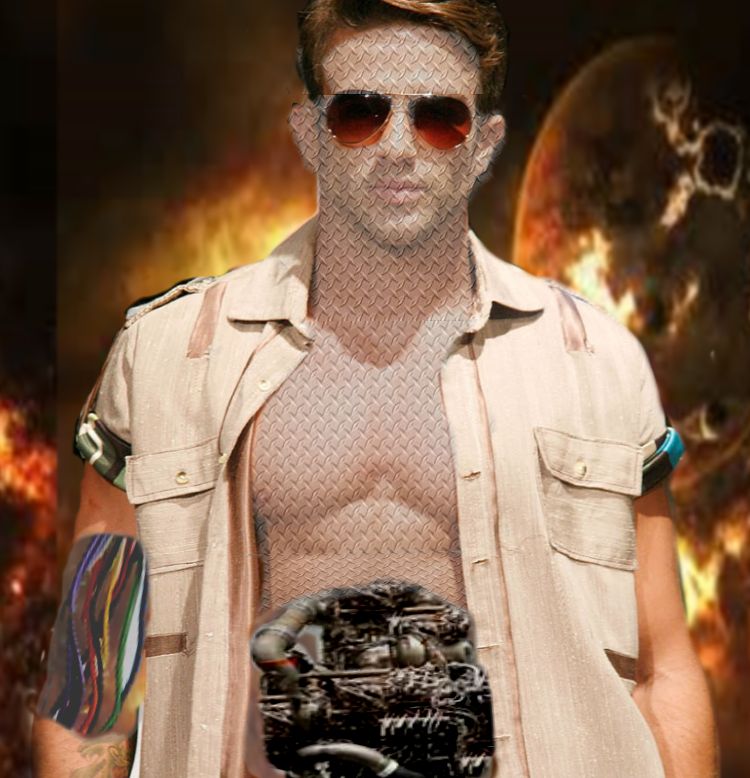 |
| Image by Josh Hopkins |
 |
| Image by Abby Tackett |
The students would really like to hear what you think of these, so please leave a comment below.
Blue Grass Baptist School Technology Students Incredible PaintShop Pro Images
Mark Ellis - Technology Teacher
Blue Grass Baptist School
Lexington, KY
The students in my 8th Grade Technology Class recently finished their 9 weeks projects using PaintShop Pro. The assignment was to create images of human robots using at least 5 different layers, effects, and tools like the cloning tool, paint tool, cropping tool, and a host of others.
Theymanipulated images that they gathered from different Internet resources.
|
| Image by Sophie Roberts |
|
| Image by Ryan Evans |
|
| Image by Owen Coombs |
|
| Image by Ben Davidson |
|
| Image by Matthew Moffit |
|
| Image by Josh Hopkins |
|
| Image by Abby Tackett |
The students would really like to hear what you think of these, so please leave a comment below.
Wednesday, December 9, 2015
PaintShop Pro Images The 8th Grade Class 2015

Image by McKenzie Pendleton
We've been using Corel's PaintShop Pro Image Editing software, and the results are quite spectacular!
 |
| Image by Sara Sue Harp |
 |
| Image by Jason Reidharr |
 |
| Image by Macy Crump |
 |
| Image by John Karenbauer |
 |
| Image by Conner Dawson |
 |
| Image by Robin Fuhrer |
 |
| Image by Lord Rich |
 |
| Image by Sara Harpe |
Tuesday, September 16, 2014
The Incredible Hu-Animals Are Here!

This project was a lot of fun for students to work on. It entailed combining humans with animals to create an interesting species of beings. Be careful -- Don't get too close!
 |
| Horse Face by Jaclynn Watts |
 |
| Lion Dude by Katrina Robinson |
 |
| You're Not Lion To Me? by Brandon Childers |
Monday, September 8, 2014
Computer Literature Class Uses PaintShop Pro and Comic Life!

Friday, September 5, 2014
More PaintShop Pro Art - The 9th & 10th Graders Exhibit
Today we had a creative quiz in Computer Lit Class using PaintShop Pro X4. There were no boundaries placed on the students creativity with this project, and here a re a few of those:
 |
| "Picnic Wonderland" by Bethany Whisman |
 |
| "Grey Paree'" by Brynne Nelson |
 |
| "Beach Bound" by Sarah Whisman |
 |
| "X Files Unleashed" by Zach Warren |
PaintShop Pro Student Images
After 2 grueling weeks of rigorous PaintShop Pro training the students in the 8th Grade Tech Applications class churned out some very impressive pieces of graphic art for for the world to see. Here a re just a few of those images.
 |
| "Fight" by Issac Fraser |
 |
| "Surf Lunch" by Jaclynn Watts" |
 |
| "Lebron" by Brandon Childers |
 |
| "Go Green" by Zoie Abner |
Thursday, May 16, 2013
More Work from the Blue Grass Baptist School Technology Students
For our final end of the year project, my students in the 7th Grade class were supposed to submit a report written and formatted in Microsoft Word, accompanied by Excel data, a PowerPoint presentation, and a poster made by using PaintShop Pro X4 version. One of my students not only turned in his work early, he also did such an amazing job I just couldn't help but feature the work here. Here are some of the images from his project. All work by Tyson Tolson
 |
| Titanic Desk by Tyson Tolson using PaintShop Pro X4 . All items on desk are separate images of real items from the Titanic. |
Rms Titanic PowerPoint presentation by Tyson Tolson. Note: some of the PowerPoint Transitions will be lost during this presentation.
 |
| Titanic Excel Spreadsheet by Tyson Tolson |
Wednesday, May 8, 2013
Another Awesome Graphic Design by a Blue Grass Baptist School Student!
One off my students just popped out a great piece of art using the basic Microsoft Paint program.
 |
| Art by Jaclynn |
Tuesday, May 7, 2013
My Students LOVE Pixie Editor!
My students really like using the site Pixie Editor. They go on that site and create all sorts of tiny icons. Here is a picture of a spider that two of my 2nd grade students made using that website.
 |
| Picture by Addison Haney, 2nd Grade |
 |
| Benjamin Hopkins,2nd grade - Lightning Ninja |
Thursday, May 2, 2013
Chuck Norris Kicks the Titanic
My students are really enjoying working with Paintshop Pro. Here is another picture one of my students did this week.
 |
| Chuck Norris kicking the Titanic buy Tyson Tolson |
Tuesday, April 30, 2013
A Lesson in Layers with PaintShop Pro X4
Today, the 4th grade class learned how to make layered images. They were tasked to place one image on top of the other and then erase part of the image on the top so that the bottom layer would be the background. Most of the students used a planet or outer space as their background. I think they did a great job !!!
Check them out!!!

Check them out!!!
 |
| Robo- Beast from Saturn by Raegan Rhodus |
 |
| Ants Rule by Noah Simmons |

Black Widow in Space by Josh Hopkins
 |
| Yoda with background added by Colter Riddlebarger |
 |
| Titanic Burning by Ben Davidson |
Subscribe to:
Posts (Atom)